
❓ Do You Actually Need One?
The honest answer depends on what you race — not on how your rig looks
A modern GT3 or formula rim already carries 10–20 inputs, and for most sprint racing that is enough. A button box earns its place the moment you run out of inputs you can find without looking: endurance racing with pit presets and driver swaps, rally with handbrake and intercom, trucks and farm sims with dozens of machine functions, or broadcast duty where you juggle cameras, replays and voice comms while driving.
The second honest reason is tactile certainty. A rotary with detents and a toggle with a guard tell your fingers what state they are in — a touchscreen or a wheel-menu does not. That is why pit-limiter, ignition and fuel-mix controls keep migrating off the rim and onto a plate or a box.
What a button box does not do: make you faster on its own. If a cheap wheel or pedal set is your limiting factor, fix that first — see our Buying Guide.
📐 The Four Routes to More Buttons
They solve different problems — pick the one that matches how you reach for a control
- Wheel-mounted button plateSits behind or around the rim and turns with it. Everything stays within thumb reach at speed — the right answer for formula and GT racing. Costs the most per input, and on some ecosystems it needs a specific hub.
- Rig- or desk-mounted boxA standalone panel bolted to the rig or sitting beside it. Far more inputs for the money, room for guarded toggles and labelled keys, and it never rotates away from you. You have to let go of the wheel to use it.
- Modular DIY kitPrinted or CNC housings plus buttons, encoders and a controller board you assemble yourself. Cheapest per input, fully your layout, and repairable. Costs you an evening or three.
- Software buttonsA Stream Deck or an on-wheel touchscreen with SimHub or the maker's own app. Infinite labels, live icons, no drilling — and no detents, so you look to confirm what you pressed.
📷 Seen at SimRacing Expo 2026
Two boxes we had in our own hands in Frankfurt, October 16–18
BavarianSimTec ControlCenter — 20 Backlit Keys, Two Encoders and a USB Hub in CNC Aluminium
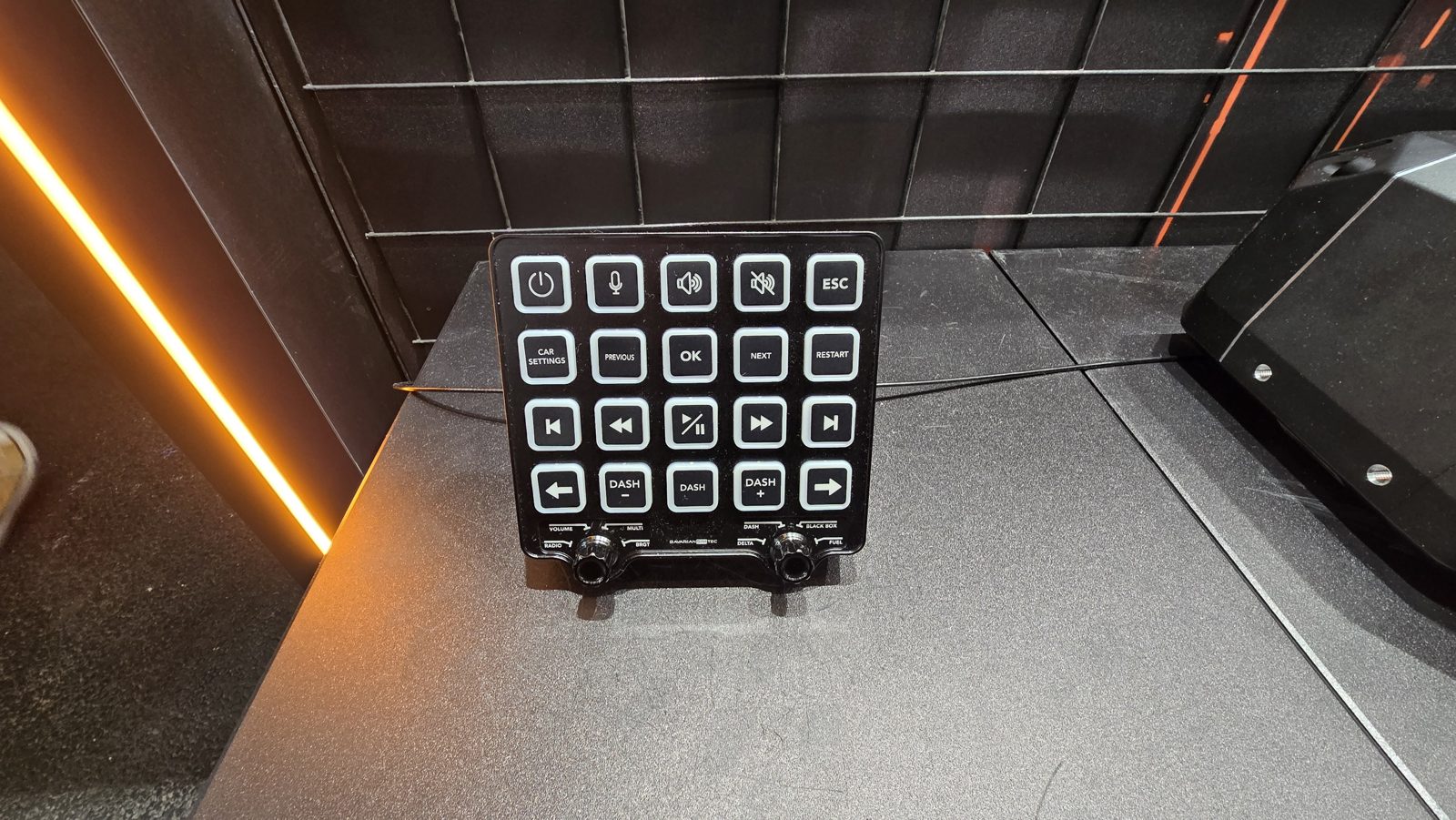
The nicest ready-made box on the show floor: 20 backlit tactile keys — pit-wall voice, car settings, dash pages — plus two rotary encoders for volume, brightness, delta and fuel, in a milled aluminium housing made in Germany. The backlight follows telemetry (BavarianSimTec calls it AdaptiveBeamTec), and the back carries a USB-C hub with three extra ports, which quietly solves the cable mess behind a rig. Price on the stand: around €300; European retailers currently list it between €339 and €409.
Source: our Expo photo diary, Oct 17 · bavariansimtec.de
October 17, 2026 — on the standPokornyi Engineering MCP MultiBox — Built by Visitors at the Workshop, Now in the Shop
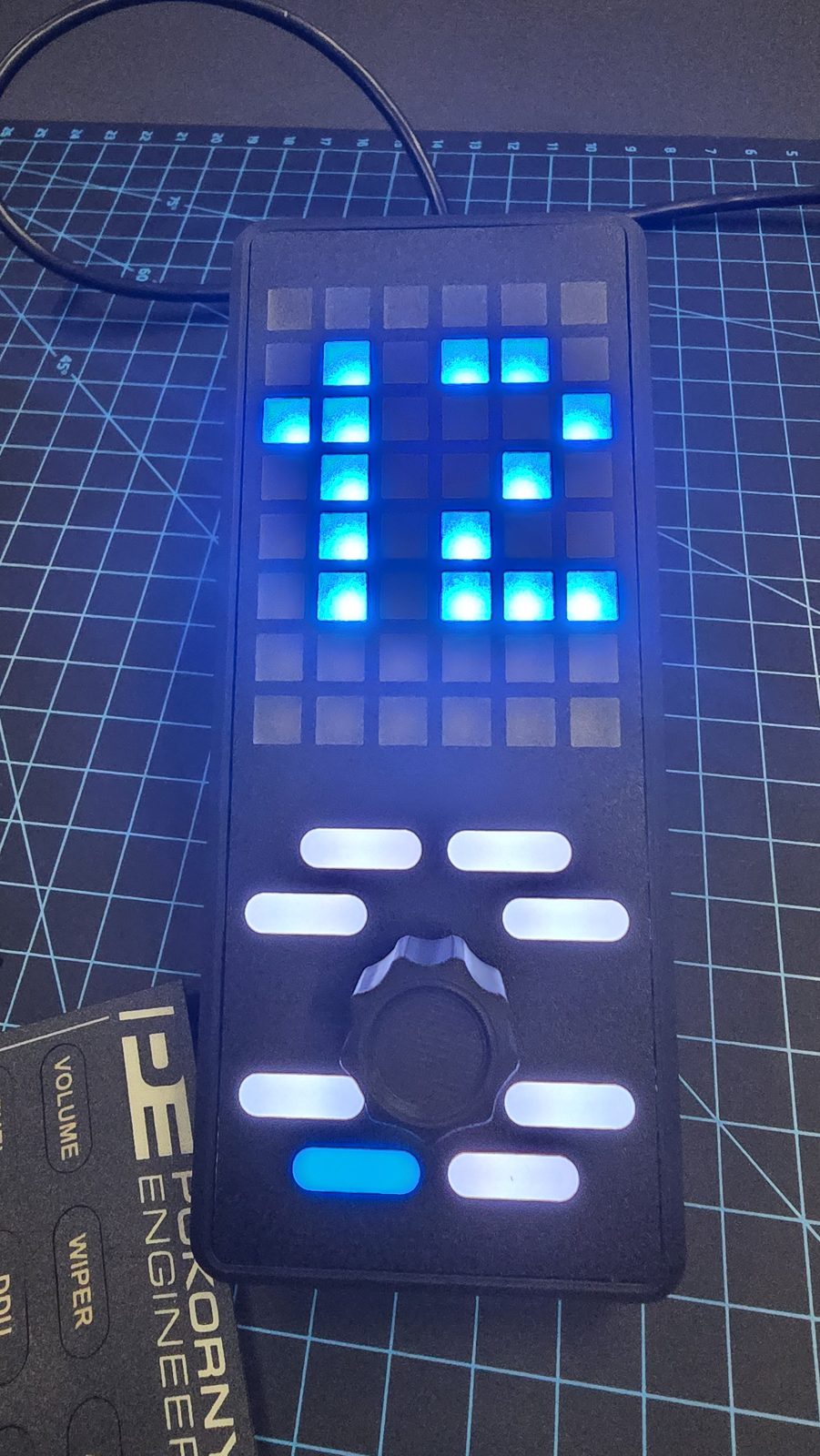
Pokornyi ran a workshop where visitors assembled their own MultiBox and took it home for free — slots were booked online and Saturday was full. The unit pairs an RGB LED matrix (gear, flags, telemetry effects) with eight backlit buttons and a multifunction rotary encoder, driven by Pokornyi's SimEngine and LedEngine plugins; the encoder's Multi-Link function puts several parameters on one knob. It is part of the modular MCP family alongside a Button Box, Encoder Box, Ignition Box and Side Rotary Box. Since the show it is available to everyone through Pokornyi's shop, as DIY files plus parts. Our verdict: top.
Source: our Expo photo diary, Oct 17 · pokornyiengineering.com
October 17, 2026 — at the workshop★ The Hybrid: Heusinkveld DisplayDash
A display and a button box in one housing — and the one launch this category has been waiting on
Heusinkveld's DisplayDash is the most interesting thing to happen to this category in two years, because it refuses to choose: a digital dash display with physical inputs around it, aimed at drivers who want pit and strategy controls plus live data without committing to a wheel-mounted screen.
- 12 push-rotary controls — each knob turns and clicks, so one input covers both selection and confirmation.
- Four push buttons and a seven-way switch.
- 17 configurable RGB LEDs for flags, shift lights and status.
- A single USB cable, and full SimHub compatibility.
Heusinkveld confirmed pricing at Sim Gaming Expo 2026: €389 including 21 % VAT in Europe, €324 excluding VAT for non-EU markets. That is noticeably above the ~€300 the company indicated when the DisplayDash was first shown in January 2026. Availability is still listed as coming soon with no preorders; Heusinkveld last pointed at mid-October 2026, and we have seen no confirmation that units have shipped. The launch has slipped more than once — originally spring 2026, then a few weeks past the August date.
Sources: Traxion — DisplayDash reveal · OverTake — release window · heusinkveld.com
📊 Market Overview 2026
What you can actually buy, by mounting style
🎯 Wheel-Mounted Button Plates
| Brand | Model | Inputs | Notes | Price |
|---|---|---|---|---|
| Fanatec | Podium Button Module Endurance | Buttons, toggles, rotaries | Needs Podium Hub or ClubSport Universal Hub | €219.95 |
| Asetek | La Prima Button Box (GT) | 8 buttons, 2× 7-way, 3× 12-pos rotary, 2 thumb encoders | Plastic inputs; rim sold separately | €234.99 |
| Fanatec | Podium Button Module Rally | Rally-specific layout | Needs a Podium-compatible hub | €269.95 |
| Asetek | La Prima Formula Button Box | Formula layout | Plastic inputs | €324.99 |
| Asetek | Forte GT Button Box | GT layout | Aluminium buttons and encoders | €339.99 |
| Asetek | Forte Formula Button Box | 12 buttons, 2 toggles, 2× 7-way, 3× rotary, 6 thumb encoders | Aluminium inputs, black or orange | €499.99 |
| Ascher Racing | B16M-USB | 16 inputs | Being replaced by the AURA GT hub (€619, Q1 2027) | ~€549 |
| Cube Controls | GT PRO V2 Button Box | Carbon faceplate, magnetic paddles | Hub-and-plate unit, handles separate | ~$680–900 |
🕸 Rig- and Desk-Mounted Boxes
| Brand | Model | Inputs | Notes | Price |
|---|---|---|---|---|
| PXN | CB1 Control Box | 30 programmable inputs | RGB backlight, plug-and-play on PC, pre-printed labels | ~€85–95 |
| Thrustmaster | SimTask Farmstick | 33 programmable buttons | Built for truck and farm sims, not circuit racing | ~$129.99 |
| Racebox | GT3-PRO Carbon | Buttons, toggles, encoders | Carbon front plate; retailer listing, specs vary by batch | ~$184 |
| BavarianSimTec | ControlCenter | 20 backlit keys, 2 encoders | CNC aluminium, telemetry-reactive backlight, 3-port USB-C hub | €339–409 |
| Heusinkveld | DisplayDash | 12 push-rotaries, 4 buttons, 7-way switch | Display + inputs, 17 RGB LEDs, SimHub; availability still open | €389 incl. VAT |
🔧 Kits, Boards and Software Panels
| Source | What it is | Capacity | Price |
|---|---|---|---|
| Leo Bodnar | BBI-32 USB interface board | Up to 32 buttons or 16 encoders, screw terminals, no soldering | ~$60 |
| Pokornyi Engineering | MCP module DIY files (MultiBox, Button Box, Encoder Box, Ignition Box) | Your layout; SimEngine / LedEngine support | Files from €20 + parts |
| Arduino route | Pro Micro / Leonardo plus printed enclosure | Limited by pins and your patience | €25–60 in parts |
| Asetek | RaceHub 4.5 Virtual Button Box | Up to 6 buttons on the wheel's own touchscreen | Free (two wheels) |
| Stream Deck + SimHub | Labelled LCD keys on the desk | 15 or 32 keys, unlimited pages | ~€150–250 |
How to read these tables. Prices are the maker's list price where one is published, otherwise the European street price we could verify, both as of October 19, 2026. Asetek's figures are the launch prices announced in March 2025. Retailer prices for the same box differ by a lot — we saw the BavarianSimTec ControlCenter between €339 and €409 on the same day — so check the shop before you buy. Where a source gave input counts that contradicted the maker's own spec sheet, we left the cell vague rather than guess. No affiliate links: every link goes to the manufacturer or to our own coverage.
🔧 Build It Yourself
The cheapest input per euro, and the only route where the layout is exactly yours
The Classic Arduino Box
A Pro Micro or Leonardo registers as a USB game controller, so toggles, buttons and encoders need no driver and no extra software. Our DIY page covers the wiring, the sketch and the printed enclosures — GT3-inspired or plain rectangular, both widely shared on Printables and Thingiverse.
To the DIY build →No Soldering: Interface Boards
If the electronics are the part you don't want, a dedicated board does it for you. Leo Bodnar's BBI-32 takes buttons, switches and encoders on screw terminals and presents up to 32 buttons or 16 rotaries to the PC — around $60, and it has been the quiet standard in flight and racing cockpits for years.
Kits With a Plan
Pokornyi Engineering sells the middle ground: downloadable designs with a step-by-step manual, a parts list and the matching buttons, encoders, guards and PCBs from the same shop. You print the housing and assemble; the layout and the LED logic are solved for you.
pokornyiengineering.com →Print the Housing
PETG is the sensible filament here — good layer adhesion, enough heat resistance for a box that lives next to a PC, and it takes threaded inserts well. Plan the cutouts around the hardware you already bought, not the other way round.
Filament guide on the DIY page →🔍 What to Look For
Six things that decide whether a box gets used or gathers dust
- Detents, not just inputs. A 12-position rotary with crisp steps is worth more than six extra buttons you have to look at. Count the controls you can identify blind.
- Encoder type. Incremental encoders send a pulse per click — fine for brake bias or volume. For a control that must land on a known state (engine map, TC level), an absolute 12-position rotary is the safer choice.
- Labelling. Pre-printed legends look sharp and lock you into one discipline; blank keys plus a sticker sheet survive a car change. Boxes with LCD keys sidestep the problem entirely.
- How it connects. A single USB cable to the PC is the simplest thing that works and is sim-agnostic. Wheel-side modules can be neater, but they tie you to one hub and one ecosystem — check what your base actually accepts.
- Mounting. Check the hole pattern and the bracket before you buy: 80/20 profile, a MagicArm-style clamp, or nothing at all. A box that cannot sit where your hand falls will not be used.
- Software support. SimHub support turns a box from an input device into an output one too — flags, shift lights and status on the same panel. Without it, the LEDs are decoration.
More hardware coverage: Hardware news · Buying Guide · SimHub Beginner's Guide · DIY & 3D printing